Disconnect a source and what it deletes
Disconnect a source on the Integrations page to remove it from your workspace and delete what SaysHere read through it.
On this page
Disconnect GitHub
You see Disconnect under a link if you can connect sources in the workspace: in your own workspace you can, and in a team its Owner and Admins can.
- 1
On Integrations, press Disconnect under the GitHub link, then Disconnect in the question.
SaysHere removes the link and deletes the documents it read from its repositories. Keep it connected closes the question and keeps the link.
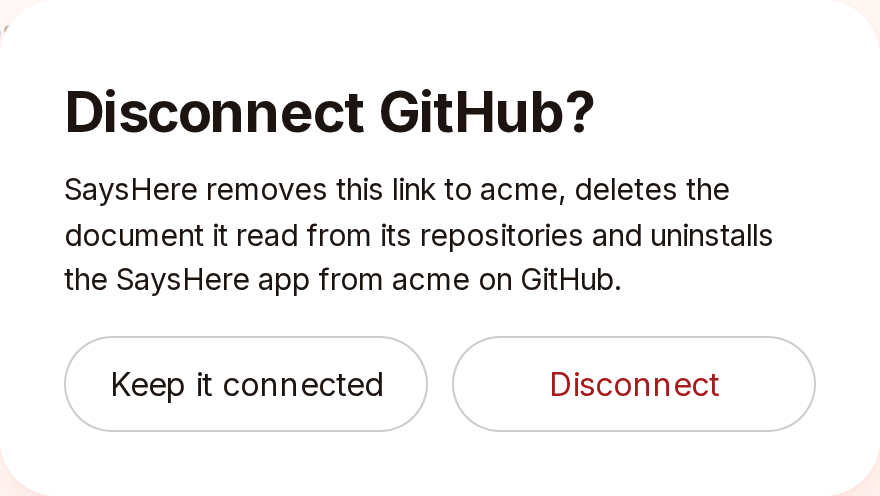

The question before SaysHere removes a GitHub link.Captured from the app on 4 November 2026.
The SaysHere app on GitHub
Disconnect deletes everything the link read, and SaysHere uninstalls the app from the GitHub account once no SaysHere workspace links it. The question says which happens. While another workspace uses the app, it stays installed. If GitHub does not answer, the row says that SaysHere will try again to uninstall its app, and SaysHere keeps trying. Uninstalling the app on GitHub, or removing a repository from it there, deletes what SaysHere read from it. Uninstalling it also ends SaysHere's access to that GitHub account.
Take one repository off
To stop reading one repository, clear it in Choose repositories and press Save repositories. Taking a repository off the link deletes its documents at once. Turning Include code off deletes the documents read from source files it no longer covers.
When an account or a team is deleted
Deleting a team removes its links the same way, and deleting your account removes the links of your own workspace. If SaysHere cannot reach GitHub to uninstall the app before such a deletion finishes, the app stays installed on that GitHub account. SaysHere reads nothing more through it, and you can uninstall it there. A link you made in a team stays with the team when you delete your account. The team keeps reading the chosen repositories until someone who may connect sources disconnects the link or the app is uninstalled on GitHub.
Disconnect Google Drive
Your Google Drive connection is yours alone, so only you see Disconnect on Google Drive's row. Disconnect deletes every copy made from your Drive, in every workspace, and asks Google to end SaysHere's permission. That also ends the permission you gave SaysHere to sign you in with that Google account, so Google asks for it again the next time you sign in.
- 1
On Integrations, press Disconnect on Google Drive's row, then Disconnect in the question.
Google Drive's row says Not connected. Keep it connected closes the question and keeps the connection.
SaysHere's access at Google
If Google does not confirm that it removed SaysHere's access, Google Drive's row says so after the Disconnect and links your Google Account's linked apps page, where you can remove SaysHere. The copies and the connection are deleted either way.
Google Drive when you leave a team or delete your account
Leaving a team, or being removed from one, deletes the files you added there, including those you shared with the team. They come from your own Google account, so they leave with you. Deleting your account also deletes every copy made from your Drive and asks Google to end SaysHere's permission.
What happens to your data
Our nightly backups lose what was deleted within 30 days. A team's record keeps who connected or disconnected GitHub, and when. Repositories you connect from GitHub