Live Transcription Apps for Lectures, Compared (2026)
The short answer
Each app in the table puts the lecturer's words on screen as they are said. SaysHere's free plan gives two hours a month, enough for a one-hour lecture in one session. Otter's Basic plan shows up to 30 minutes of each conversation's transcript. SaysHere records no audio.
A live transcription app for lectures has two jobs: show the lecturer's words while they are still talking, and keep going until the class ends. We read the pages of four apps that do the first job: SaysHere, Otter, Live Captions on the iPhone and Live Transcribe on Android. Below is how each does the second, what it leaves you to study from, and what it costs.
The apps at a glance
Slide the table to see all four.
| SaysHere | Otter | Live Captions | Live Transcribe | |
|---|---|---|---|---|
| Runs on | A browser on a phone or a laptop | Web, desktop and phone apps | iPhone 11 or later | Android phones |
| Words on screen as they are said | Yes | Yes | Yes | Yes |
| Free each month | Two hours a month | 300 minutes a month | Not listed | Not listed |
| Transcript from one free session | Until your hours run out | 30 minutes | Not listed | Not listed |
| Transcript afterwards | A text file you save | Basic: your 25 latest conversations; paid plans keep them all | Text you copy into another app | Kept in the app for up to three days |
| Keeps the audio | No | Yes | Not listed | Stored in the app for a time |
| Cheapest paid plan | Plus: $14 a month, or $140 a year | Pro: $8.33 a month per user, billed yearly | Not listed | Not listed |
Prices and plans as each company's own pages showed them on and .
What to check before class
Five questions sort these apps for a lecture:
- Will one session give you the whole lecture? A cap on each session matters more than a monthly total when a class runs an hour.
- Do the words appear while the lecturer talks? All four here do.
- What is left to study from afterwards: a file you keep, a transcript inside the app, or text you copy out?
- Where does the audio go, and is a recording kept?
- Does it run on your phone, your laptop, or both?
SaysHere: a live transcript in your browser that keeps no audio
SaysHere is a web page, so there is nothing to install. Open it in Safari on an iPhone with iOS 17 or later, in Chrome on Android, or in a laptop's browser, press Start, and the transcript fills in line by line as the lecturer speaks.
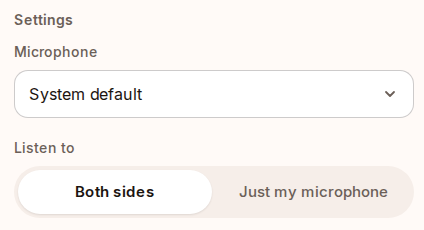
In the picture, Listen to is set to Both sides, which hears a call in another browser tab with your microphone. On a laptop in a lecture hall, choose Just my microphone, so Start hears the room. A phone hears the room on its own.
The free plan gives two hours of listening a month, and a session runs until your hours run out, so a one-hour lecture fits in one session. When the class ends, save the transcript as a text file. Each line carries its time on the session's clock. Plus gives 15 hours a month for $14, or $140 for a year. Pro gives 30 hours a month for $24, or $240 for a year. The pricing page has the details.
SaysHere never records audio. While you listen, the sound passes through our server, which holds it in memory, on its way to Deepgram or OpenAI to be turned into text. OpenAI may keep each request's audio and text for up to 30 days to check for abuse, as our privacy page sets out.
Know its limits before a long class. The transcript does not say who is speaking. Summaries are being rebuilt, so today a session gives you the transcript alone. Listening needs a connection. On an iPhone, keep the page open with the screen on, since locking the phone or switching apps can pause listening.
Otter: live notes, with up to 30 minutes of each conversation's transcript on the free plan
Otter shows a live transcript too, and it runs on the web and in desktop and phone apps. Its free Basic plan lists live transcription and gives 300 minutes a month, according to Otter's pricing page. Otter's help page on the Basic plan says a recording past 30 minutes goes on, but Basic shows only 30 minutes of its transcript. An hour-long lecture takes two conversations to read in full. Basic shows your 25 most recent conversations and archives the older ones, and Otter records the audio, which you can play back beside the transcript.
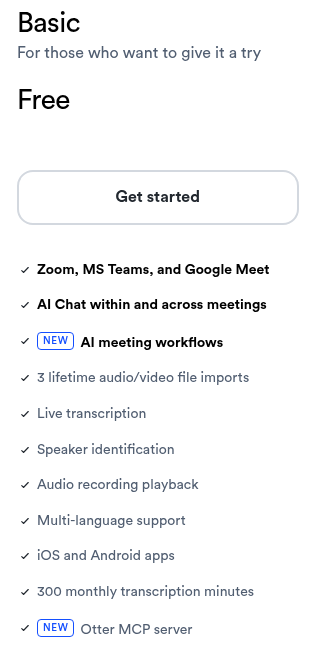
Otter does more than SaysHere once the class is over: its pricing page lists speaker names, summaries with action items and search across your conversations on every plan. Pro costs $8.33 a month per user, billed yearly, and students and teachers with a .edu address get 20 percent off Pro.
On an iPhone: Live Captions, Notes and SaysHere in Safari
The iPhone has two transcription tools of its own. Live Captions, on iPhone 11 or later, turns speech around you into text: tap Live Captions, then Microphone, to transcribe a conversation in the room, and copy the captions into another app such as Notes when you are done. Apple's guide says Live Captions isn't available in all languages, countries or regions, and that it shouldn't be relied on in high-risk or emergency situations.
The Notes app records and shows a live transcript on iPhone 12 and later, with the phone's language set to one of ten languages. It keeps the recording with the note, and deleting the recording deletes its transcript. SaysHere runs in Safari on iOS 17 or later, for a transcript you can save as a file with no recording kept.
On Android: Google Live Transcribe
Live Transcribe comes installed on Pixel phones and some other Android phones, and Google Play has it for the rest. It shows speech and other sounds as text on your screen, keeps your transcription history for up to three days, and lets you copy or export it before then. In a language you have downloaded to the phone, it transcribes without an internet connection.
Google's help page describes Live Transcribe for Android alone. On an iPhone, Google Translate's Transcribe mode translates a lecture given in another language as it is spoken, and can save the transcript.
Record now, study later: Knowt, StudyFetch and RemNote
Some study apps start from a recording. Knowt makes notes and flashcards from a lecture you record or upload. StudyFetch turns your material into flashcards, quizzes and practice tests. RemNote records a lecture with a transcript and timestamped notes, then makes flashcards, quizzes and summaries from it. StudyFetch and RemNote also show a live transcript while they record, and Knowt's page says it takes notes as the class goes. Choose one of them when you want study material made for you. SaysHere gives you the transcript and leaves the studying to you.
Ask before you transcribe a class
Some places, and some schools, require everyone's agreement before a class is transcribed, so check your school's rules and ask the lecturer. Before you press Start, SaysHere offers a sentence you can say to the room, so the people in it know their words go to a service to be turned into text. For calls rather than classes, our guide to AI note takers without a bot sorts the tools by how they listen.
Questions students ask
Is there a free app that transcribes lectures live?
Yes. Live Captions is a setting on the iPhone 11 and later, and Google's Live Transcribe runs on Android phones. SaysHere's free plan gives two hours a month in the browser, and Otter's Basic plan gives 300 minutes a month and shows up to 30 minutes of each conversation's transcript.
How long a lecture fits in one free session?
On SaysHere, a session runs until your hours run out, so a one-hour lecture fits in the free plan's two hours. Otter's Basic plan shows up to 30 minutes of each conversation's transcript, and the rest opens on a paid plan. Apple's and Google's pages state no cap.
Can an iPhone transcribe a lecture live?
Yes. Live Captions transcribes the room on an iPhone 11 or later, in the languages and regions Apple supports. The Notes app shows a transcript while it records on an iPhone 12 or later, with the phone's language set to one of ten languages. SaysHere runs in Safari on iOS 17 or later.
Is Google Live Transcribe on iPhone?
Google's help page describes Live Transcribe for Android phones. On an iPhone, Google Translate's Transcribe mode translates a lecture given in another language as it is spoken, and can save the transcript.
Do students pay less for Otter?
Yes. Otter's pricing page gives students and teachers with a .edu address 20 percent off Pro, which comes to $6.67 a month, billed $79.99 a year.
Can the transcript become flashcards?
Not in SaysHere, which gives you the transcript to save as a text file. Knowt, StudyFetch and RemNote make flashcards from a lecture you record.
The quickest test is your next lecture. Try the notetaker now, or compare the plans on the pricing page.