AI Note Takers Without a Bot, Sorted by How They Listen
The short answer
Every tool here works with no bot in the call. Granola, Jamie and Krisp hear a call through their Mac or Windows apps. SaysHere hears a meeting tab and your microphone in Chrome or Edge. Of the four, only Krisp has a mode that keeps a recording.
An AI note taker without a bot listens from your own device, so no extra participant joins the call. The tools differ in how they hear the other side, what you install, and whether a recording is kept. This post sorts them by how they listen.
What without a bot means
A meeting bot is a participant that everyone in the call can see. Otter's Notetaker, for one, joins Zoom, Google Meet and Microsoft Teams calls as a participant named after your account, “[Your Name]'s Notetaker (Otter.ai)”, and can join a meeting you do not attend. A tool without a bot listens on your side of the call instead: through your computer's sound, a browser tab, or your microphone.
The tools at a glance
Slide the table to see all four.
| SaysHere | Granola | Jamie | Krisp | |
|---|---|---|---|---|
| Joins the call as a bot | No | No | No | Only if you invite Krisp Bot |
| How it hears the meeting | A meeting tab and your microphone, in Chrome or Edge | Your computer's sound and your microphone | Your microphone and system audio | Krisp's microphone and speaker, chosen in your call app |
| What you install | Nothing; it opens in a browser | A Mac or Windows app | A Mac or Windows app | A Mac or Windows app |
| Keeps a recording | No | No | No; the audio is deleted once transcribed | In its recording modes, and through Krisp Bot |
| Names who is speaking | No | With speaker tags set up, on Meet, Zoom and Teams; Me and Them elsewhere | Yes, once you name each voice | Tells speakers apart; naming them is not stated |
| Free plan | Two hours a month | Basic: notes from the last 30 days | 10 meetings a month, 30 minutes each | A 7-day trial |
| Cheapest paid plan | Plus: $14 a month, or $140 a year | Business: $14 a month per user, billed monthly | Plus: $24 a month billed yearly, or $29 monthly | Core: $16 a month per user billed monthly, or $8 a month billed yearly |
Prices and plans as each company's own pages showed them on , and .
A web page: SaysHere
SaysHere is a web page, so there is nothing to install. Start hears your microphone. In Chrome or Edge on a computer, press Hear the other side in Controls and pick the meeting's tab, and SaysHere hears it beside your microphone. A call in Google Meet, or in Teams or Zoom on the web, is heard from both ends that way. On a phone, SaysHere hears the room through the microphone, which suits a meeting around a table. The live session joins no call.
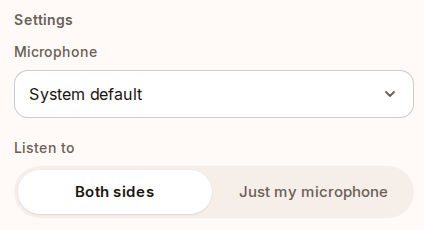
SaysHere never records audio. The sound passes through our server, which holds it in memory, on its way to Deepgram or OpenAI to be turned into text, and the privacy page says what each of them keeps. SaysHere is behind on three things. The transcript names no speakers. The tab route hears a meeting in the browser; a call in the Zoom or Teams desktop app needs a loopback audio input, such as BlackHole, which you set up yourself. Summaries are being rebuilt, so today a session gives you the transcript, which you can save as a text file.
Desktop apps that hear your computer: Granola, Jamie and Krisp
Granola, Jamie and Krisp have iPhone and Android apps as well. This section compares their desktop routes, which hear the other side of a call.
Granola's help page says there is no meeting bot: Granola runs on your computer and uses its sound and your microphone, and it does not record or save audio or video at any point during the call. With speaker tags set up, the desktop app can name the people in a Google Meet, Zoom or Microsoft Teams call, as its speaker tags page explains; elsewhere the transcript shows Me and Them. Basic is free with your notes from the last 30 days, and Business costs $14 a month per user, billed monthly, on its billing page.
Jamie also runs on your device and captures the conversation through your microphone and system audio, with no bot and no third party for the others to see. Its privacy policy says the audio recording is deleted as soon as the transcription is complete. You name each voice once, and Jamie remembers it in later meetings, as its speaker guide says. Jamie's help page on plans gives the free plan 10 meetings a month of up to 30 minutes each. Plus costs $24 a month billed yearly, or $29 billed monthly, on Jamie's pricing page.
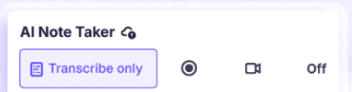
Krisp works as a microphone and speaker of its own that you choose in your call app. Its note taker can transcribe only, record audio, record the screen, or stay off. Krisp Bot joins Zoom, Google Meet or Teams only when you invite it. Krisp has a 7-day trial in place of a free plan, and Core costs $16 a month per user billed monthly, or $8 a month billed yearly, on its pricing page.
Otter, known for its bot, has a route without one too: its desktop app for Mac and Windows can record a meeting from the computer's sound with no Notetaker in the call.
The meeting app's own AI: Zoom, Google Meet and Microsoft Teams
The meeting apps take notes without a bot too. Zoom's My Notes takes notes in Zoom calls, and in other meeting apps it transcribes your computer's sound and microphone; the free Workplace Basic plan includes three uses a month, according to Zoom's pricing. In Google Meet, Take notes for me puts a notes document in the organizer's Drive after the call and shows a pencil icon to everyone while it runs. It needs an eligible Google AI plan, or a Workspace edition that Google's admin guide lists: Business Standard, Business Plus, Enterprise Standard or Enterprise Plus. Microsoft Teams builds an intelligent recap from a meeting's transcript for people with Teams Premium or a Microsoft Copilot license. Meet's notes also work for an in-person meeting, and the Teams recap works inside Teams calls.
Which ones keep a recording
A tool can skip the bot and still keep a recording, so check both. Of the four in the table, Krisp alone has recording modes, beside its transcribe-only mode. Granola and SaysHere keep no audio, and Jamie deletes its audio once the transcript is done. A tool that keeps no recording can still send the sound to a service to be turned into text, as SaysHere does through our server to Deepgram or OpenAI, so read the privacy page of the tool you pick.
Telling the people on the call
With no bot in the call, the others may not know a note taker is listening, so tell them. Some tools help: Jamie can email the attendees of a meeting on your connected calendar a notice before it starts, Granola and Krisp each have a setting to let others know you are using them, and Google Meet shows its pencil icon to everyone. Before you press Start, SaysHere offers a sentence you can say to the room. Some places require everyone's agreement first. For classes rather than calls, our comparison of live transcription apps for lectures covers the phone in the room.
Questions
What is the best AI note taker without a bot?
It depends on where your meetings happen. For a call in a browser tab with nothing to install, SaysHere. For the Zoom or Teams desktop apps, an app that hears your computer, such as Granola, Jamie or Krisp. For notes inside one platform, that platform's own AI.
Does Zoom take AI notes without a bot?
Yes. Zoom's My Notes takes notes in Zoom calls, and in other meeting apps it transcribes your computer's sound and microphone. Zoom's pricing page gives the free Workplace Basic plan three uses a month.
Can I take notes on a Google Meet call without a bot?
Yes. Meet's own Take notes for me writes generated notes, not a transcript, with an eligible Google Workspace edition or Google AI plan. For a live transcript, SaysHere hears a Meet tab with your microphone in Chrome or Edge on a computer.
Is AI note-taking the same as recording?
It depends on the tool. SaysHere and Granola keep no recording, and Jamie deletes its audio once it is transcribed. Krisp records in its recording modes, and through Krisp Bot when you invite it. A tool that keeps no recording can still send the sound to a service to be turned into text.
Is there a free AI note taker without a bot?
Yes. SaysHere's free plan gives two hours a month, Granola's Basic plan is free with your notes from the last 30 days, and Jamie's free plan covers 10 meetings a month of up to 30 minutes each. Krisp offers a 7-day trial.
The quickest test is your next call. Try the notetaker now, or compare the plans on the pricing page.